
If you are facing following Error while installing Reporting extension for dynamics axapta.
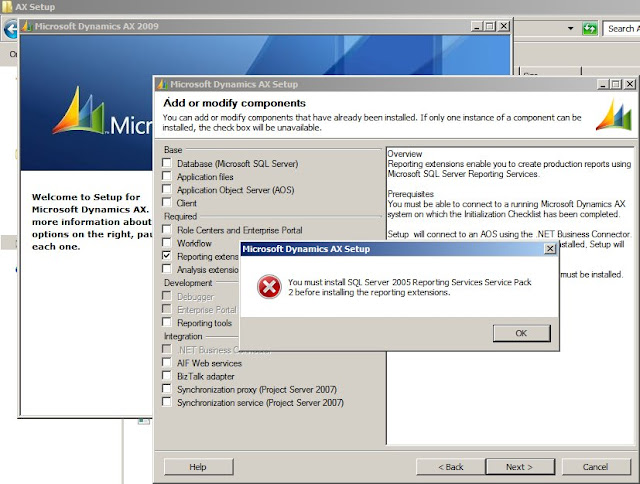
1. Locate the AX Reporting services dll from the extracted AX 2009 SP1 folder [\\AX2009SP1\support\axsetupresources\microsoft.dynamics.setup.reportingservices.dll;File Version - 5.0.1000.52]
2. Copy the microsoft.dynamics.setup.reportingservices.dll into the folder: \\DynamicsAX\Msi\Components32\Program Files\Microsoft Dynamics AX\50\Setup [since my system is 32-bit so Components32]
3. It will ask to replace the existing dll having File Version - 5.0.593.0. Say Yes and replace. Now, carry on with the installation process.
The issue coming from SQL server reporting component; not from AX if you are using sql 2005 then install service pack 2 for reporting extension or else if you wish to go for sql 2008 r2 then install full component of sql 2008 r2 after removing sql 2005 completely. in that case you need to reinstall your AX base components AOS, DB from scratch again. also you should go for restart of OS after each uninstallation and installation. hope this will solve your issue.

1. Locate the AX Reporting services dll from the extracted AX 2009 SP1 folder [\\AX2009SP1\support\axsetupresources\microsoft.dynamics.setup.reportingservices.dll;File Version - 5.0.1000.52]
2. Copy the microsoft.dynamics.setup.reportingservices.dll into the folder: \\DynamicsAX\Msi\Components32\Program Files\Microsoft Dynamics AX\50\Setup [since my system is 32-bit so Components32]
3. It will ask to replace the existing dll having File Version - 5.0.593.0. Say Yes and replace. Now, carry on with the installation process.
The issue coming from SQL server reporting component; not from AX if you are using sql 2005 then install service pack 2 for reporting extension or else if you wish to go for sql 2008 r2 then install full component of sql 2008 r2 after removing sql 2005 completely. in that case you need to reinstall your AX base components AOS, DB from scratch again. also you should go for restart of OS after each uninstallation and installation. hope this will solve your issue.